
A free tuner and metronome for guitar, bass, string and plucked instruments. Precise, offline and ad-free.
The app interface is currently in German. German labels are quoted in this manual with the English meaning in brackets.
Contents
01 Welcome
DBX Tuner listens to your instrument through the microphone and shows at a glance whether a note is sharp, flat or spot on. It also includes a metronome, a reference tone, adjustable concert pitch, historical and Turkish tuning systems and an intonation check for guitar and bass.
The app is free, works without an internet connection and collects no data.
02 Getting started
- Install and open the app.
- Allow microphone access when asked on first launch. Without it the tuner cannot hear anything.
- Hold your phone or tablet close to the instrument (about 20–50 cm / 8–20 in) and play a single note.
At the bottom you will find three areas: „Stimmen“ (Tune), „Metronom“ (Metronome) and „Einstellungen“ (Settings).
03 Chromatic tuning
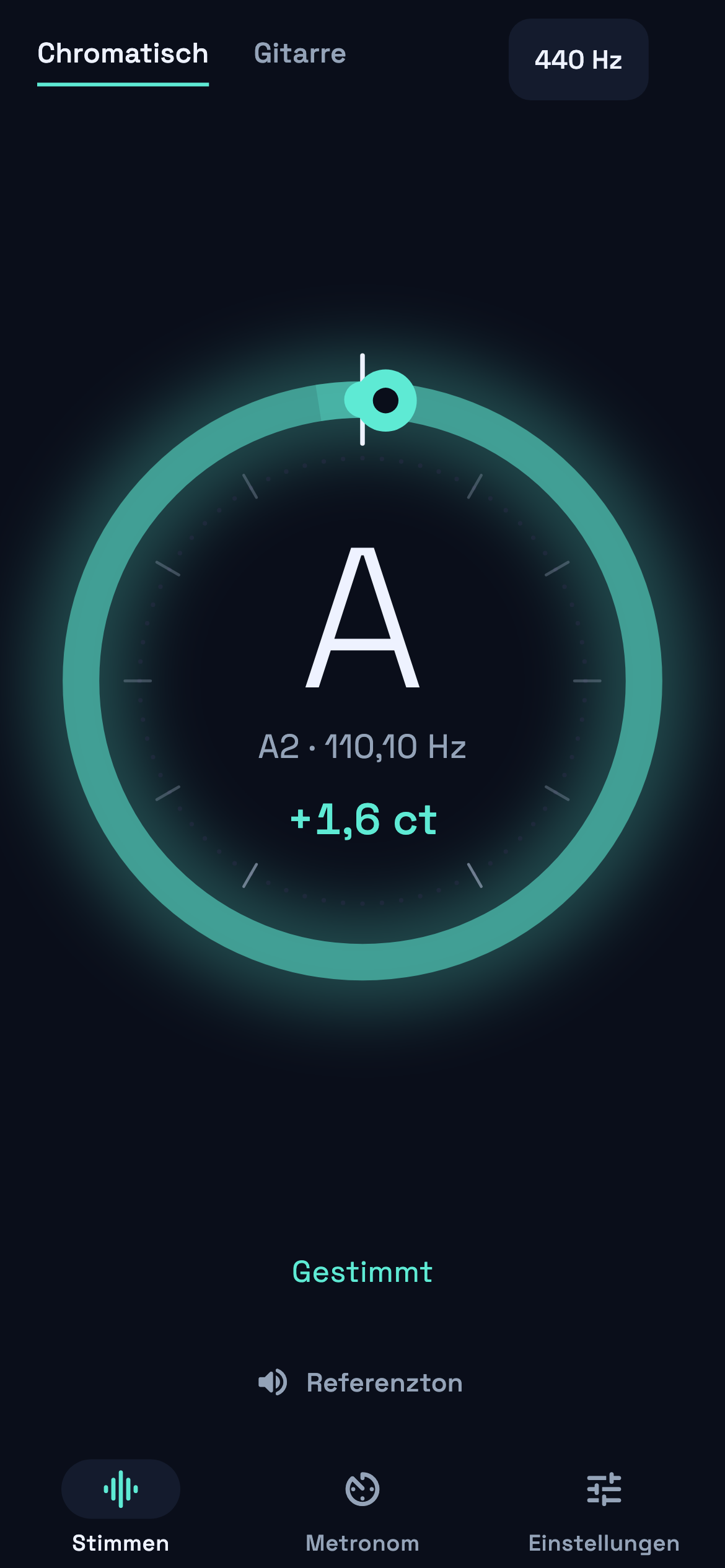
In „Chromatisch“ (Chromatic) mode, top left, DBX Tuner detects any note – ideal for every instrument and for voice.
- In the centre you see the detected note, its octave, the frequency in Hz and the deviation in cents (100 cents = one semitone).
- The ring shows the deviation: an arc to the right means sharp, to the left means flat. The line at the top is the target.
- Colours: teal = in tune, yellow = slightly off, red = clearly off. When the note is in tune the whole ring glows and the phone vibrates briefly.
- The hint below the ring tells you what to do, e.g. „Etwas zu tief · leicht anziehen“ (slightly flat – tighten a little).
04 Tuning an instrument
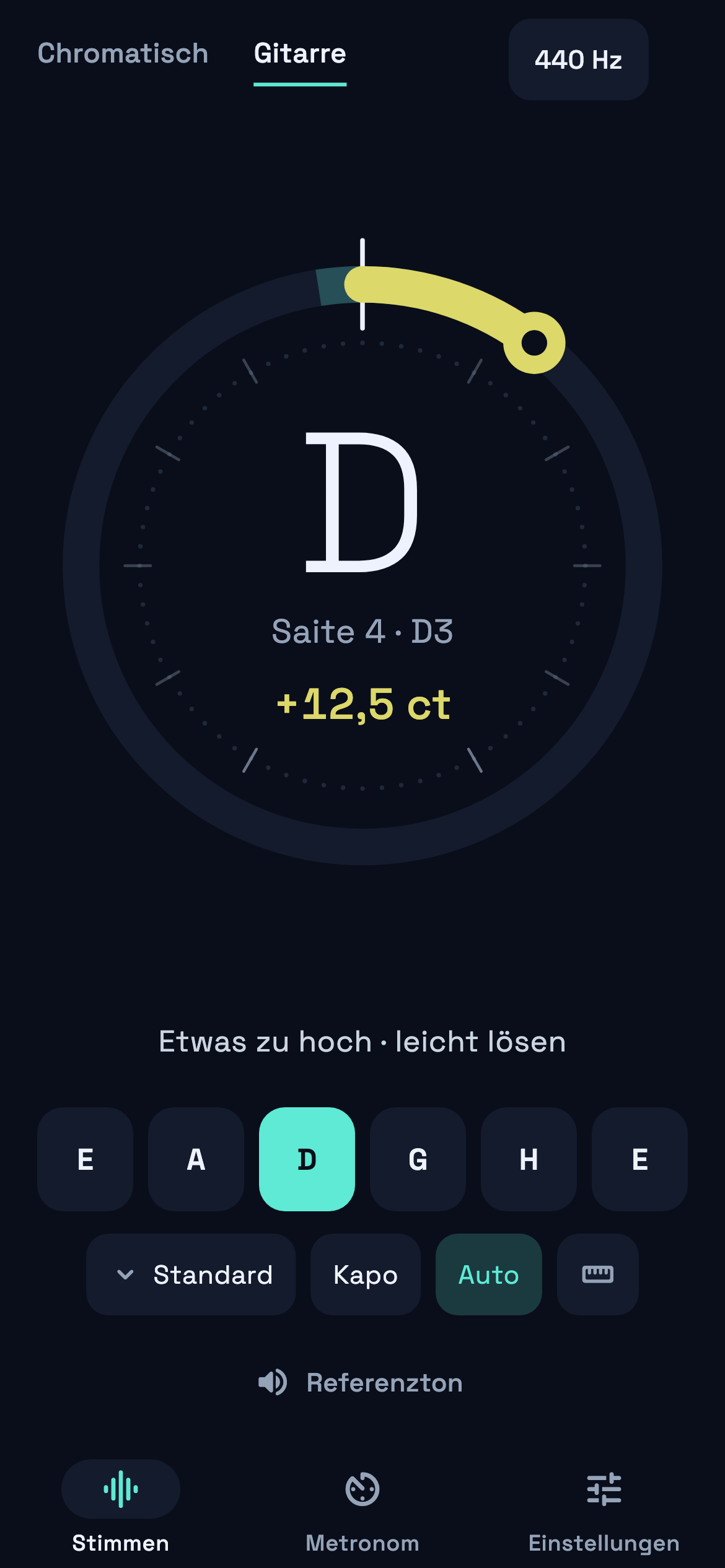
Tap the name of your instrument at the top (e.g. „Gitarre“, guitar). The strings appear as tiles at the bottom.
- Auto (on): the app detects which string you are playing and highlights it.
- Lock a string: tap a string tile. Auto switches off and the app measures against that string only – useful for strings that are far out of tune.
- Tuned strings turn teal, so you can see which ones are still missing.
- Choose a tuning: tap the tuning button (e.g. „Standard“) and select instrument and tuning: guitar (standard, drop D, half/whole step down, DADGAD, open G/D/E, drop C), 4- and 5-string bass, ukulele, violin, viola, cello, bağlama/saz and oud.
- Custom tuning: in the same window tap „Eigene Stimmung“ (custom tuning), enter a name and set each string with − / +. Delete custom tunings with the bin icon.
- Capo („Kapo“): on guitar, bass, ukulele and bağlama you can set the capo fret. All target notes shift accordingly.
05 Concert pitch (Hz)
Tap 440 Hz at the top right to change the reference pitch A4. All notes are recalculated higher or lower automatically.
- Presets: 415 (baroque), 430 (classical), 432, 440 (standard), 442 (orchestra), 443 (Berlin/Vienna).
- Fine adjustment in 0.1 Hz steps with − / + or the slider (400–480 Hz).
06 Reference tone
Tap „Referenzton“ (reference tone) to play a note for tuning by ear. In instrument mode it plays the selected string (and follows when you switch strings); in chromatic mode it plays the last detected note or A. Tap again to stop.
07 Intonation check (guitar & bass)
The ruler icon in instrument mode checks whether your guitar plays in tune at the 12th fret.
- Tune the string normally first.
- Select the string and play the 12th-fret harmonic until the bar is full.
- Play the fretted note at the 12th fret.
- The app shows the result: if the fretted note is sharp, move the saddle slightly away from the neck; if it is flat, move it towards the neck.
08 Metronome
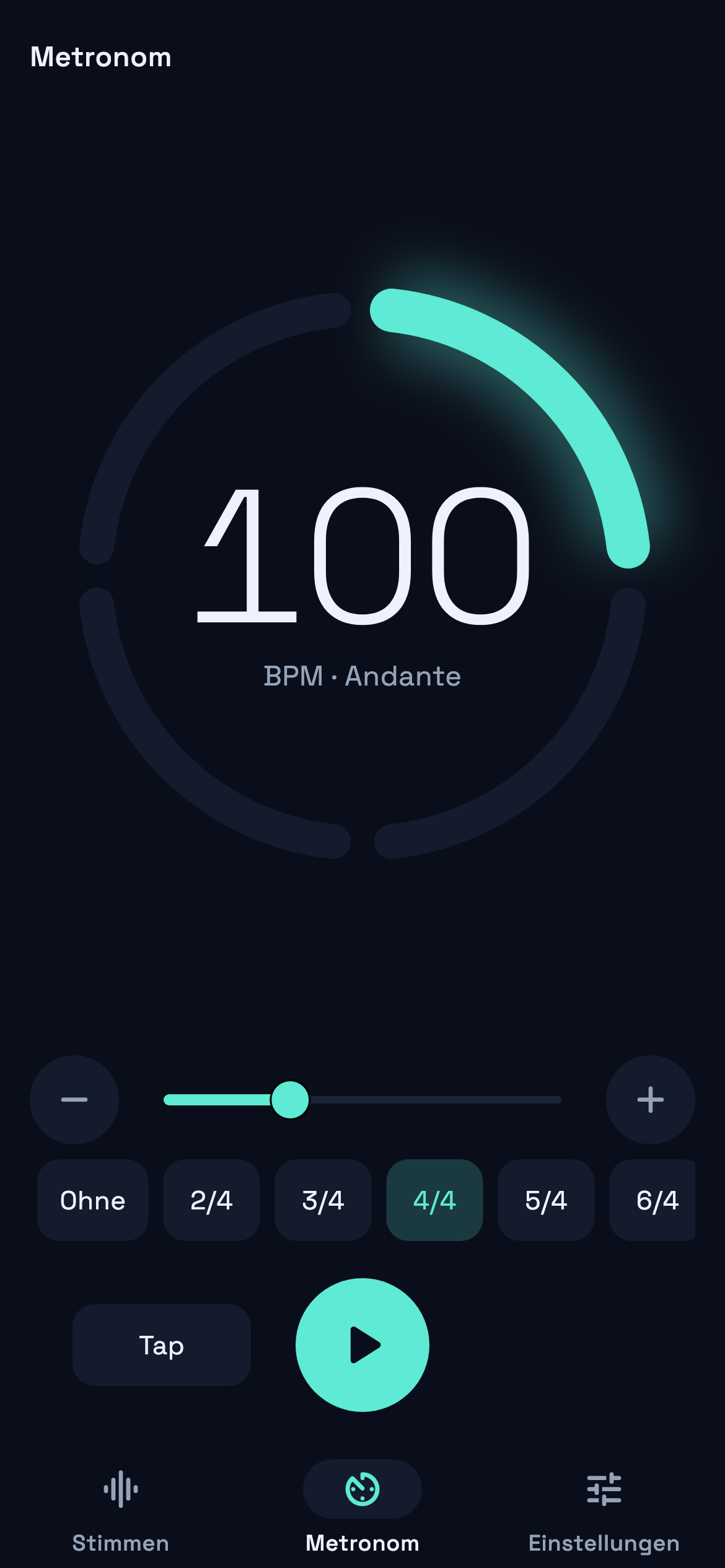
- Tempo: 30–250 BPM with the slider or − / +. The Italian tempo marking (e.g. Andante) is shown.
- Tap: tap „Tap“ at least twice at the desired tempo.
- Time signature: set beats per bar (1–16) with − / + and the note value (/2, /4, /8, /16) separately – e.g. 3/4, 5/8, 6/8, 7/8, 9/8 or 12/8. One click equals one beat of the chosen note value. The first beat is accented; in 6/8, 9/8 and 12/8 every third eighth is accented as well. With 1 beat per bar the metronome clicks without accents.
- The ring shows every beat of the bar; the current beat lights up.
- Start and stop with the large round button.
09 Settings („Einstellungen“)
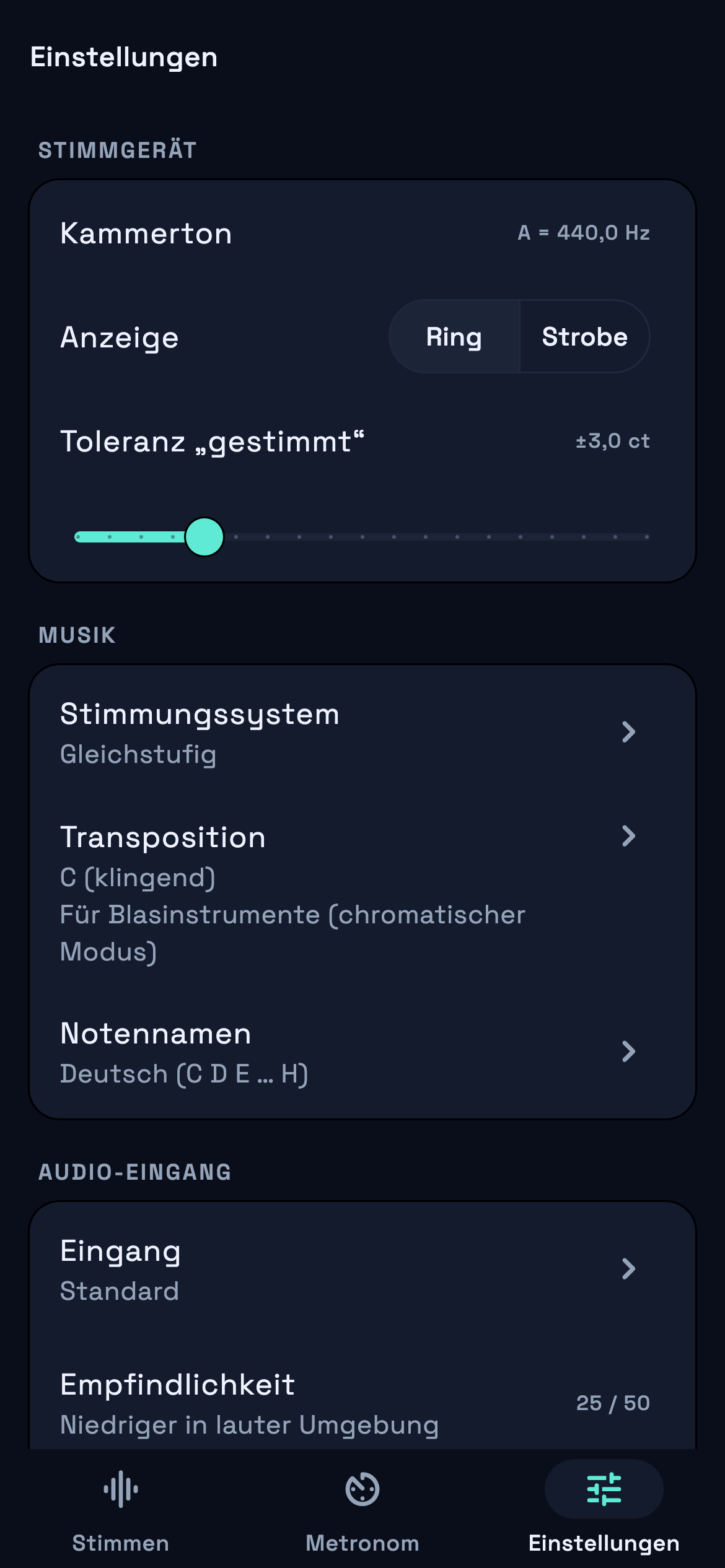
- „Anzeige“ (display): „Ring“ or „Strobe“. With strobe the stripes move right when sharp, left when flat and stand still when in tune – extremely precise.
- „Toleranz“ (tolerance): how close (±1 to ±10 cents) a note must be to count as in tune.
- „Stimmungssystem“ (temperament): equal (default), Werckmeister III, meantone (¼ comma), just (major) with selectable root, and Turkish (53 commas).
- „Transposition“: for wind instruments in B♭, E♭, F or G – the app then shows the written instead of the sounding note.
- „Notennamen“ (note names): German (C D E … H), international (C D E … B) or solfège (Do Re Mi).
- „Eingang“ (input): choose another microphone or audio interface.
- „Empfindlichkeit“ (sensitivity): lower it in noisy surroundings. The level meter shows whether your signal reaches the threshold (marker).
- Keep the screen on and vibration on „gestimmt“ (in tune) can be switched on or off.
- „Über“ (about): privacy, imprint, licences, version and „Zurücksetzen“ (reset – deletes all settings and custom tunings).
10 Turkish system (53 commas)
For makam music (e.g. bağlama, saz, ney, kanun) select „Türkisch (53 Koma)“ under Settings › Stimmungssystem. The octave is then divided into 53 commas (Arel-Ezgi-Uzdilek system). Next to the note the app shows how many commas it deviates from the nearest natural note, e.g. „H −1 Koma“ (segâh; H = B in German note names).
11 Tips & troubleshooting
- Nothing happens: check microphone permission (iPhone/iPad: Settings › Privacy & Security › Microphone; Android: Settings › Apps › DBX Tuner › Permissions) and raise the sensitivity.
- Jumpy display: pluck one string firmly, mute the others and lower the sensitivity in noisy rooms.
- Wrong string detected: lock the string (Auto off), especially if it is far out of tune.
- Everything seems equally out of tune: check concert pitch (440 Hz), temperament (equal) and transposition (C).
- Low notes (bass): hold the device closer to the instrument or amp, or use an audio interface.
12 Privacy
DBX Tuner works entirely offline. The microphone signal is analysed in memory only and is never recorded or transmitted. Only your settings are stored on the device. No ads, no tracking, no account.
Contact & support
DBX Sound · Owner Deniz Bahadir · Schulstraße 41, 32584 Löhne, Germany · info@dbxsound.com · dbxsound.com